Keep the site if it is worth keeping.
A rebuild is not the default recommendation. If the platform and structure are viable, I repair the problems that are actually holding it back.

Pixelhatch Studio
Pixelhatch repairs existing business websites that are slow, awkward on mobile, unclear or simply not doing enough for the business — without pushing a rebuild when the site is worth keeping.
I handle the technical performance, UX, content structure, SEO and AI-readability work, then implement the fixes directly in the site.
Is this the right service?
If the underlying website is sound, optimisation is usually the faster and more sensible first move. The aim is a better site — not an audit document you still have to act on yourself.
A rebuild is not the default recommendation. If the platform and structure are viable, I repair the problems that are actually holding it back.
Speed, mobile behaviour, UX, service-page clarity, SEO and AI readability are treated as connected parts of the same website.
Send me the site and what feels wrong. I can quickly tell you whether it needs optimisation, a focused repair or a rebuild.
The problem
Business websites collect friction over time: slow assets, old plugins, mobile issues, unclear service pages, buried proof and calls to action that no longer match what the business needs.
I start with the highest-value problems and repair what is worth keeping. If the site is fundamentally sound, there is no reason to sell you a rebuild.
What gets measured
I use Google’s Core Web Vitals and PageSpeed data to find real friction: slow loading, delayed interactions and unstable layouts. The numbers guide the work; they are not the product.
Main content appears quickly
Interactions respond quickly
The layout stays stable
Proof from Pixelhatch
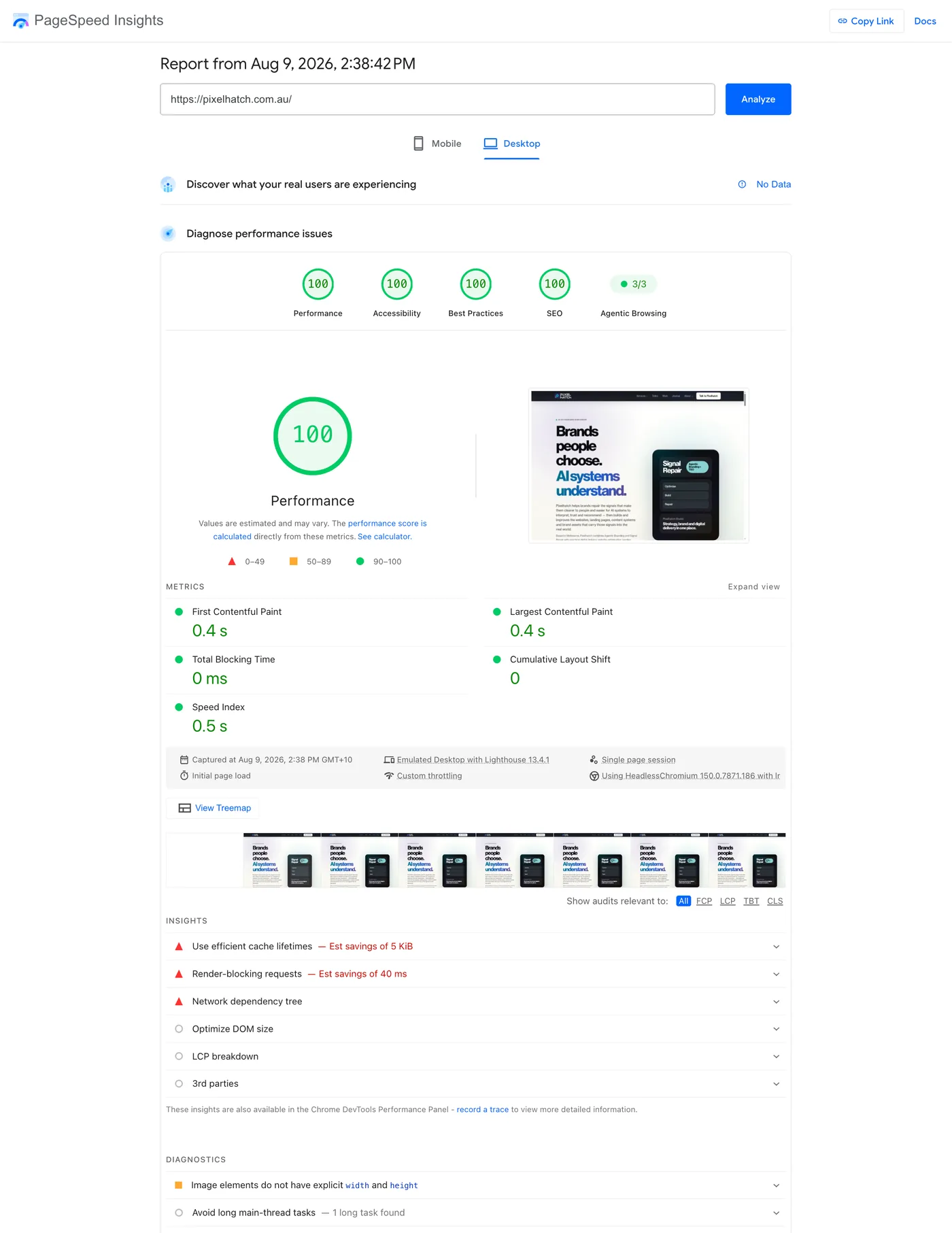
A PageSpeed Insights desktop test for pixelhatch.com.au on 9 August 2026 returned 100 across all four Lighthouse categories. That does not mean every client site should chase 100 — it shows the standard of implementation behind the work.
What gets done
Optimisation can be tightly scoped around one issue or combined into a broader performance, content and visibility pass.
Reduce avoidable friction without destabilising the site.
Make existing pages behave properly across the devices people actually use.
Turn vague or underperforming pages into clearer commercial assets.
Strengthen the signals surrounding what the business does and why it should be trusted.
How it works
The job starts with the site in front of us, not a predetermined package.
Review the site, performance data, content structure and the pages most connected to revenue or visibility.
Separate meaningful fixes from cosmetic score-chasing and identify what should actually change first.
Make the agreed technical, content, UX and visibility improvements directly in the site.
Re-test performance, responsive behaviour, content structure and the relevant search or AI visibility signals.
Pixelhatch difference
Technical performance matters, but so does what the page actually says. Pixelhatch improves both so the public website works as one coherent business asset.
Deliverables
A faster, cleaner and more stable version of the website you already own.
Responsive pages that behave properly on desktop, tablet and mobile.
Clearer service content, hierarchy and calls to action where the site is under-explaining the business.
SEO and AI-visibility improvements implemented in the site rather than left as a strategy document.
Questions
No. WordPress and Elementor are common optimisation projects for Pixelhatch, but the work can also apply to other website stacks where access and implementation are practical.
Often, yes. Many performance problems can be improved through asset, image, font, loading, layout and implementation changes without changing the visual identity or rebuilding the entire site.
Pixelhatch can implement the fixes. The service is designed for clients who want the website improved, not just another document explaining what is wrong with it.
Yes. Where relevant, Pixelhatch can improve metadata, structured data, content hierarchy, FAQs, proof, internal linking and answer-ready content alongside technical website work.
Pixelhatch will recommend a rebuild only when the existing platform, architecture or implementation genuinely makes repair inefficient. If the current site is worth keeping, optimisation is usually the better first move.
Performance can contribute to search success because Google uses Core Web Vitals within its ranking systems, but speed is not a shortcut to rankings. Relevance, useful content, authority and the overall page experience still matter. Pixelhatch treats performance as one part of a stronger search experience, not as a standalone ranking promise.
WordPress itself is not automatically slow. Themes, page builders, plugins, custom styles, images, fonts, analytics and third-party services can accumulate and add more CSS, JavaScript, requests or server work than individual pages need. Optimisation identifies which layers are creating meaningful cost and which functionality should be preserved.
There is no responsible universal score guarantee. Pixelhatch benchmarks the existing site, works toward strong Core Web Vitals and removes meaningful bottlenecks. Some sites can reach very high Lighthouse scores; others are constrained by essential third-party tools, hosting, themes or platform choices. The result is measured against the starting point and the practical ceiling of the site.
Start here
Send the URL, existing files or a short brief. I’ll tell you what I would prioritise and whether the job is worth doing.