Analyse first
Inspect the objective and project, identify the real work, choose the intelligence required and estimate the likely spend before execution starts.


Helm is a local intelligence-control and continuity layer for coding agents. Give it the job, let it work out how much intelligence each part deserves, then approve the plan before anything runs.

Why Helm exists
A repository inspection, a routine file change and a difficult architecture decision should not automatically consume the same level of intelligence. Helm treats the job as a sequence of technical work rather than one giant model choice.
It analyses the objective, preserves any stages or constraints you explicitly supplied, creates internal execution steps where it needs them, and assigns model capability and reasoning effort stage by stage. Stronger intelligence is used when the evidence warrants it, not simply because it is available.
Helm is not a general chatbot. It is built for coding agents and technical agents that actually inspect, edit, test, debug, deploy and operate against real projects.
How it works
You do not need to write an orchestration spec to use an orchestration tool.
“Build me a website for my cookie shop. Use Astro, set it up in GitHub, choose the right hosting for online ordering, deploy it, and make sure everything works.”
Helm can turn a normal objective like that into the technical work required to complete it. If you do provide explicit stages, Helm preserves them instead of inventing a different structure.
Inspect the objective and project, identify the real work, choose the intelligence required and estimate the likely spend before execution starts.
Use cheaper capable models for routine work and stronger reasoning where complexity, risk or evidence genuinely justifies it.
Run tests, inspect evidence and repair failed work instead of treating a model response as proof that the job is finished.
Watch live provider capacity, preserve enough allowance to stop safely and keep the job resumable when the coding agent reaches its limit.
Analyse job
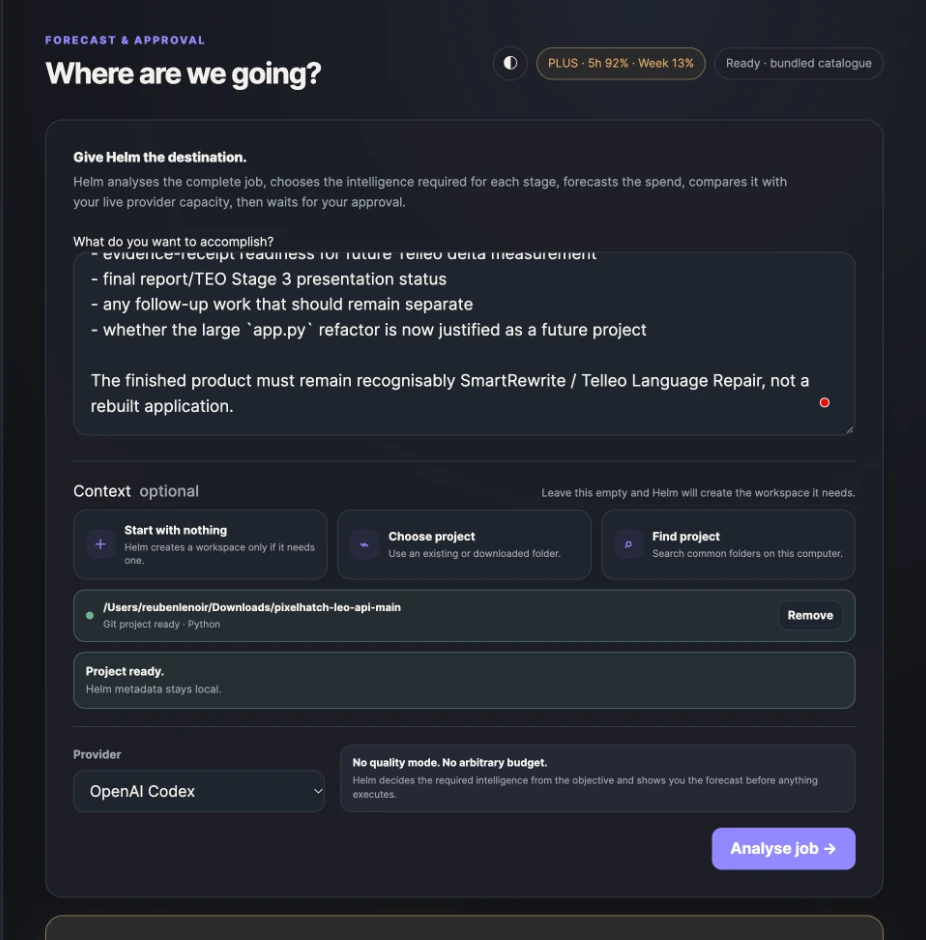
Analyse job is the planning gate. Helm reads the objective and project, works out what needs doing, forecasts the coding-agent workload and compares it with live provider capacity before you approve execution.
Continuity failsafe
Helm watches provider capacity while work is running. At the warning threshold it tells you the margin is getting tight. At the protected reserve it stops before starting another expensive turn and leaves the project in a state that can be continued safely.
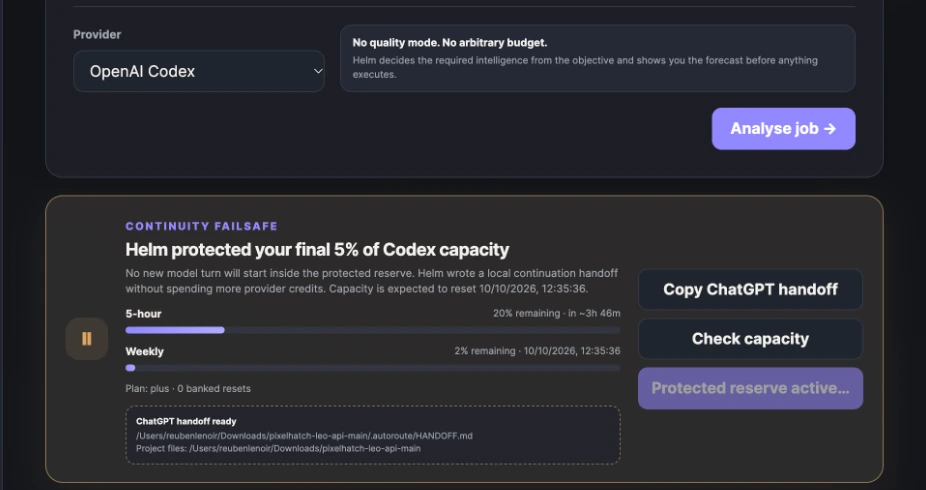
Helm warns that the limiting provider window is approaching the reserve.
Helm protects the final reserve and does not start another coding-agent turn.
The execution position, project path and local handoff are preserved. Helm generates a compact prompt for continuing the technical job in ChatGPT if you want to keep moving.
When coding-agent capacity returns, the saved Helm job can continue from the recorded position instead of repeating completed work.
Local first
Helm runs locally, keeps its run metadata local and points continuation back to the project you already have. It does not copy your repository into some second Helm workspace just to create a handoff.
Download + install
No Terminal command is required to launch Helm after installation. The current beta is unsigned, so macOS and Windows may ask you to approve the app the first time.
Why am I seeing this? Helm is currently a public beta and has not yet been signed and notarised with Apple, so macOS may ask you to approve it manually the first time. A normally signed release is planned.
Download macOS UniversalQuestions
No. Helm sits above the coding agent. Codex still performs the technical work; Helm plans, routes intelligence, watches capacity, verifies execution and preserves continuity.
No. A normal objective is enough. Helm can create its own internal execution structure. If you explicitly provide stages, milestones or constraints that matter, Helm preserves them instead of silently replacing them.
No. Helm is designed for coding agents and technical task-running agents working against projects, repositories, files, tests, deployments and infrastructure. It is not intended to route basic chat.
Helm keeps the paused run state locally. Once the limiting provider window has recovered beyond the protected reserve, the job can be continued from its recorded execution position rather than started again.
Yes. Helm v0.8.0 is a free public beta while Pixelhatch tests the routing, forecasting and continuity system across a wider range of real coding-agent workloads.